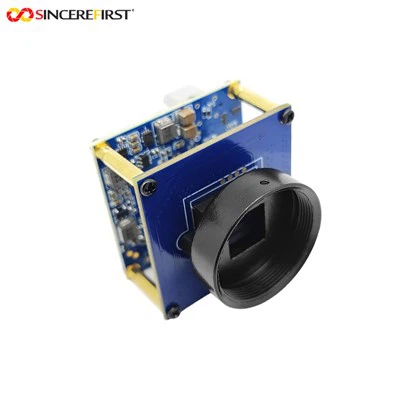
In the ever - evolving landscape of technology, the compatibility of hardware components is a crucial factor for users and businesses alike. As a supplier of USB 3.0 camera modules, I often get asked about the compatibility of our products with Windows 10. This blog post aims to delve into this topic and provide a comprehensive answer.
Understanding USB 3.0 and Windows 10
USB 3.0, also known as SuperSpeed USB, is a significant upgrade from its predecessors. It offers much higher data transfer speeds, with a theoretical maximum of 5 Gbps, compared to the 480 Mbps of USB 2.0. This high - speed data transfer is essential for camera modules, especially those capable of capturing high - resolution video and images.
Windows 10, on the other hand, is one of the most widely used operating systems in the world. It has been designed to be highly compatible with a wide range of hardware devices, including USB 3.0 devices. Microsoft has made significant efforts to ensure that Windows 10 can recognize and work with various USB 3.0 peripherals, thanks to its advanced driver management system.
Compatibility of USB 3.0 Camera Modules with Windows 10
In general, most USB 3.0 camera modules are compatible with Windows 10. Windows 10 comes with built - in drivers for many common USB devices, including USB 3.0 camera modules. When you connect a USB 3.0 camera module to a Windows 10 computer, the operating system will usually detect the device automatically and install the necessary drivers.
However, there are a few factors that can affect the compatibility:
1. Driver Availability
Although Windows 10 has built - in drivers for many devices, some specialized USB 3.0 camera modules may require specific drivers. These drivers can usually be downloaded from the manufacturer's website. As a USB 3.0 camera module supplier, we provide detailed driver support for our products. For example, our Customizable Lens Compact 4k UHD CSI Sony IMX678 USB 3.0 Camera Module comes with comprehensive driver documentation and support to ensure seamless integration with Windows 10.
2. Hardware Compatibility
The physical connection between the camera module and the computer is also important. Make sure that your computer has a USB 3.0 port. If your computer only has USB 2.0 ports, the camera module will still work, but it will operate at the slower USB 2.0 speed. Additionally, some older computers may have USB 3.0 ports that are not fully compliant with the USB 3.0 standard, which can lead to compatibility issues.
3. Firmware Updates
Camera modules may require firmware updates to work properly with Windows 10. Firmware updates can improve the performance and compatibility of the camera module. As a supplier, we regularly release firmware updates for our products to ensure that they are up - to - date and compatible with the latest operating systems.
Benefits of Using USB 3.0 Camera Modules on Windows 10
Using a USB 3.0 camera module on a Windows 10 computer offers several benefits:
1. High - Speed Data Transfer
As mentioned earlier, USB 3.0 provides much higher data transfer speeds than USB 2.0. This means that you can capture and transfer high - resolution video and images quickly. For example, our Dual USB Camera Module can take advantage of the USB 3.0 speed to transfer large amounts of data in a short time, making it ideal for applications such as video conferencing, surveillance, and industrial inspection.
2. Compatibility with Windows 10 Software
Windows 10 has a wide range of software applications that can work with USB 3.0 camera modules. For example, you can use the built - in Camera app in Windows 10 to take photos and record videos. There are also many third - party software applications available for more advanced features, such as image processing and video editing.
3. Easy Installation and Use
Installing a USB 3.0 camera module on a Windows 10 computer is usually very easy. You simply plug the camera module into a USB 3.0 port, and the operating system will detect it and install the necessary drivers. Once installed, you can start using the camera module immediately.
Troubleshooting Compatibility Issues
If you encounter compatibility issues when using a USB 3.0 camera module with Windows 10, here are some steps you can take:
1. Check the Driver
Make sure that you have installed the correct drivers for your camera module. You can download the latest drivers from the manufacturer's website. If you are using our High - Speed USB 3.0 UHD Compact Sony IMX415 CSI Camera Module, you can find the drivers on our official website.
2. Check the USB Port
Ensure that the USB port you are using is a USB 3.0 port. You can try connecting the camera module to a different USB 3.0 port to see if the problem persists.


3. Update the Firmware
Check if there are any firmware updates available for your camera module. Updating the firmware can often resolve compatibility issues.
4. Contact Technical Support
If you have tried all the above steps and still have problems, you can contact our technical support team. We have a team of experts who can help you troubleshoot and resolve any compatibility issues.
Conclusion
In conclusion, most USB 3.0 camera modules are compatible with Windows 10. Windows 10's advanced driver management system and support for USB 3.0 devices make it easy to use USB 3.0 camera modules on this operating system. However, it is important to ensure that you have the correct drivers, a compatible USB port, and up - to - date firmware.
If you are interested in purchasing our USB 3.0 camera modules, we invite you to contact us for a procurement discussion. Our team is ready to provide you with detailed product information and support to meet your specific needs.
References
- Microsoft. Windows 10 Hardware Compatibility.
- USB Implementers Forum. USB 3.0 Specification.