How to adjust the brightness of the OV9281 Camera Module?
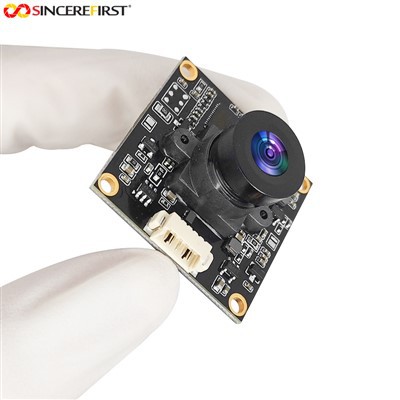
As a trusted supplier of the OV9281 Camera Module, I understand the importance of achieving optimal brightness settings for your camera. The OV9281 is a high - performance camera module known for its excellent image quality, but getting the right brightness can sometimes be a challenge. In this blog, I'll share some effective methods to adjust the brightness of the OV9281 Camera Module.
1. Understanding the Basics of Brightness in the OV9281
Before diving into the adjustment methods, it's crucial to understand how brightness is determined in the OV9281. The brightness of an image captured by the camera module is influenced by several factors, including the exposure time, gain, and the lighting conditions of the scene.
Exposure time refers to the length of time that the camera's sensor is exposed to light. A longer exposure time allows more light to reach the sensor, resulting in a brighter image. However, if the exposure time is too long, the image may become overexposed, with washed - out details.
Gain, on the other hand, amplifies the electrical signal generated by the sensor. Increasing the gain can make the image brighter, but it also introduces noise, which can degrade the image quality.
2. Manual Brightness Adjustment
One of the most straightforward ways to adjust the brightness of the OV9281 Camera Module is through manual adjustment. This method gives you full control over the exposure time and gain settings.
Exposure Time Adjustment
To adjust the exposure time, you need to access the camera module's settings. Most OV9281 Camera Modules come with a software interface that allows you to configure various parameters. In the settings menu, look for the "Exposure Time" option. You can increase or decrease the exposure time in small increments. Start with a short exposure time and gradually increase it until you achieve the desired brightness. Remember to check the image quality after each adjustment to avoid overexposure.
Gain Adjustment
The gain adjustment is also available in the camera module's settings. Similar to the exposure time adjustment, find the "Gain" option in the menu. Increasing the gain can quickly brighten the image, especially in low - light conditions. However, as mentioned earlier, it also increases noise. So, use it sparingly and try to find a balance between brightness and image quality.
3. Automatic Brightness Adjustment
If you prefer a hands - off approach, the OV9281 Camera Module also supports automatic brightness adjustment. This feature, often called Automatic Exposure Control (AEC), continuously monitors the lighting conditions of the scene and adjusts the exposure time and gain accordingly.
To enable AEC, simply turn on the corresponding option in the camera module's settings. Once enabled, the camera will automatically optimize the brightness of the captured images. However, keep in mind that AEC may not always provide the perfect result in all lighting conditions. In some cases, such as scenes with high contrast or rapidly changing lighting, the automatic adjustment may not be fast enough or accurate enough.
4. External Lighting Considerations
In addition to adjusting the camera module's internal settings, external lighting can also have a significant impact on the brightness of the captured images.
Ambient Lighting
Make sure the ambient lighting in the environment where the camera is used is appropriate. If the lighting is too dim, even with the maximum gain and exposure time settings on the camera, the image may still be too dark. On the other hand, if the lighting is too bright, the image may be overexposed. You can use additional light sources, such as LED lights, to supplement the ambient lighting.
Lighting Direction
The direction of the light can also affect the image brightness and quality. Front - lighting, where the light source is directly in front of the subject, can provide even illumination but may create flat images. Side - lighting can add depth and texture to the image but may result in uneven brightness. Back - lighting, with the light source behind the subject, can create a silhouette effect and make it challenging to capture a well - lit subject. Experiment with different lighting directions to find the best setup for your specific application.
5. Calibration for Consistent Brightness
To ensure consistent brightness across different camera modules and over time, calibration is essential. Calibration involves adjusting the camera module's settings based on a known reference.


White Balance and Brightness Calibration
Many OV9281 Camera Modules support white balance and brightness calibration. You can use a calibrated white card or a known testing target to perform the calibration. Place the card or target in the camera's field of view and follow the calibration procedure provided in the camera module's documentation. This will help the camera to accurately measure the brightness and color temperature of the scene, resulting in more consistent image quality.
6. Related Product Recommendations
If you are looking for other high - quality camera modules, I'd like to recommend some of our related products. You can check out the Best Sony Camera 8MP IMX678 COMS Image Sensor USB Camera Module, which offers excellent image quality and performance. Another great option is the 8mp External Trigger Webcam Android Waterproof Inspection USB2.0 Camera Module, suitable for various industrial and mobile applications. And if you need a 5MP camera module, the 5MP AR0521 Android USB Web Camera Capture Image Module is a reliable choice.
7. Contact for Purchase and Consultation
If you have any questions about adjusting the brightness of the OV9281 Camera Module or are interested in purchasing our products, feel free to reach out to us. We have a team of experts ready to assist you with your technical inquiries and procurement needs. Whether you are a small - scale developer or a large - scale enterprise, we can provide you with the right solutions.
References
- OV9281 Camera Module User Manual
- Digital Image Processing textbooks
- Industry research papers on camera module optimization