Live streaming has become an increasingly popular form of content creation and communication in recent years. Whether you're a vlogger, a gamer, or a business owner looking to connect with your audience in real - time, having a good camera module is crucial for a high - quality live stream. As a 2MP camera module supplier, I'm here to share with you how to use a 2MP camera module for live streaming.
Understanding the 2MP Camera Module
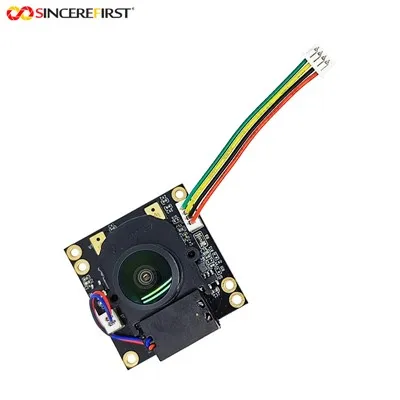
A 2MP (2 megapixel) camera module is capable of capturing images with a resolution of approximately 1600x1200 pixels. This resolution is sufficient for most live - streaming applications, providing clear and sharp visuals. The 2MP camera module comes in various types, each with its own features and advantages.


One of the popular options is the Fixed Focus Omnivision Ov9713 CMOS Image Sensor USB Interface UVC Camera Module. This module uses the Omnivision Ov9713 CMOS image sensor, which offers excellent image quality and low power consumption. The USB interface and UVC (Universal Video Class) compatibility make it easy to connect to a computer or other devices for live streaming.
Another option is the H264 Camera Module. The H264 encoding technology in this module allows for efficient video compression, reducing the bandwidth requirements for live streaming. This is especially useful when you're streaming over a limited or unstable network.
The Full HD 1080P Monochrome CMOS Global Shutter USB 2.0 Camera Module is also a great choice. Although it's a monochrome camera, it provides high - speed and accurate image capture, which can be beneficial for certain types of live - streaming content, such as industrial inspections or scientific research.
Preparing for Live Streaming
Before you start using your 2MP camera module for live streaming, there are several steps you need to take to ensure a smooth and high - quality stream.
Hardware Setup
- Connect the Camera Module: First, connect the 2MP camera module to your device. If it's a USB - based camera module, simply plug it into a USB port on your computer. Make sure the connection is secure to avoid any interruptions during the live stream.
- Position the Camera: Place the camera in a suitable location. Consider the lighting conditions, the angle of view, and the subject you want to capture. For example, if you're streaming yourself, position the camera at eye level to create a more natural and engaging view.
- Check the Focus: If your camera module has adjustable focus, make sure to set it correctly. A sharp focus will ensure that your viewers can see the details clearly.
Software Setup
- Install the Drivers: Some camera modules may require specific drivers to work properly. Check the manufacturer's website for the latest drivers and install them on your computer.
- Choose a Live - Streaming Platform: There are many live - streaming platforms available, such as YouTube Live, Twitch, and Facebook Live. Sign up for an account on the platform of your choice and familiarize yourself with its features and settings.
- Configure the Streaming Settings: In the live - streaming software, you need to configure the video settings. Set the resolution to match the capabilities of your 2MP camera module. You can also adjust the frame rate, bitrate, and other parameters to optimize the video quality and bandwidth usage.
Using the 2MP Camera Module for Live Streaming
Once you've completed the hardware and software setup, you're ready to start live streaming with your 2MP camera module.
Starting the Stream
- Open the Live - Streaming Software: Launch the live - streaming software on your computer. Log in to your account on the streaming platform.
- Select the Camera: In the software, select your 2MP camera module as the video source. You should see a preview of the camera feed on the screen.
- Adjust the Settings: Double - check the video settings, such as resolution, frame rate, and bitrate. Make any necessary adjustments to ensure the best possible video quality.
- Start the Stream: Click the "Start Stream" button in the software. The live stream will begin, and your viewers will be able to see the content from your 2MP camera module.
During the Stream
- Monitor the Video Quality: Keep an eye on the video quality during the stream. If you notice any issues, such as pixelation or lag, you may need to adjust the settings or check your network connection.
- Interact with Your Viewers: Engage with your viewers by responding to their comments and questions. This will make the live stream more interactive and engaging.
- Manage the Lighting: Pay attention to the lighting conditions during the stream. If the lighting is too bright or too dark, it can affect the video quality. You may need to adjust the lighting setup or use additional lighting equipment.
Ending the Stream
- Stop the Stream: When you're finished with the live stream, click the "Stop Stream" button in the software.
- Save the Recording: Some live - streaming platforms allow you to save the recording of the stream. This can be useful for future reference or for sharing with your audience.
Tips for a Better Live - Streaming Experience
- Optimize the Lighting: Good lighting is essential for a high - quality live stream. Use natural light whenever possible, or invest in artificial lighting equipment, such as softbox lights or ring lights.
- Use a Tripod or Mount: A tripod or mount will help keep the camera steady, reducing camera shake and providing a more professional look.
- Test the Connection: Before starting the live stream, test your network connection to ensure a stable and fast connection. You can use online speed - testing tools to check your internet speed.
- Prepare Your Content: Plan your live - streaming content in advance. This will help you stay organized and engaged during the stream.
Conclusion
Using a 2MP camera module for live streaming is a great way to create high - quality content and connect with your audience in real - time. By understanding the features of the camera module, preparing properly, and following the tips mentioned above, you can ensure a smooth and engaging live - streaming experience.
If you're interested in purchasing a 2MP camera module for your live - streaming needs, we're here to assist you. Our company offers a wide range of 2MP camera modules with different features and specifications. We can provide you with detailed product information and support to help you make the right choice. Contact us to start a procurement discussion and take your live - streaming to the next level.
References
- General knowledge about camera modules and live - streaming technology.
- Product specifications and information from the camera module manufacturers.