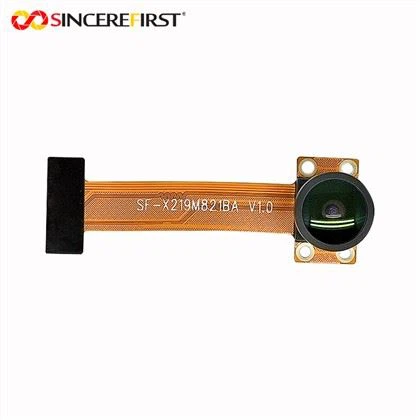
Motion detection is a valuable feature in camera modules, enabling a wide range of applications such as security surveillance, smart home automation, and industrial monitoring. As a supplier of the OV9281 Camera Module, I'm here to guide you through the process of enabling motion detection on this high - performance camera.
Understanding the OV9281 Camera Module
The OV9281 Camera Module is a cutting - edge device known for its excellent image quality and flexibility. It offers high - resolution imaging capabilities, making it suitable for various scenarios where clear visual data is essential. Before diving into the motion detection setup, it's crucial to have a basic understanding of the module's features and specifications.
The OV9281 comes with a set of registers that can be configured to control different aspects of its operation. These registers act as the control knobs for functions like image resolution, frame rate, and of course, motion detection. To enable motion detection, we need to interact with these registers in a specific way.
Prerequisites
Before starting the motion detection setup, ensure that you have the following:
- Hardware: An OV9281 Camera Module properly connected to your development board or system. Make sure all the power and communication interfaces are correctly established.
- Software Tools: A programming environment that can communicate with the camera module. This could be an IDE (Integrated Development Environment) if you're using a microcontroller, or a software library if you're working on a more complex system.
- Documentation: The datasheet of the OV9281 Camera Module. This document provides detailed information about the register map and the functions of each register, which is essential for the configuration process.
Step - by - Step Guide to Enabling Motion Detection
Step 1: Initialization
The first step is to initialize the OV9281 Camera Module. This involves setting up the basic parameters such as the image format, frame rate, and resolution. You can use the following code snippet as a starting point in a programming language like Python if you're using a Raspberry Pi or a similar system with a camera interface:
import smbus

# Initialize I2C bus
bus = smbus.SMBus(1)

# OV9281 I2C address
OV9281_ADDR = 0x30

# Function to write to a register
def write_register(reg, value):
    bus.write_byte_data(OV9281_ADDR, reg, value)

# Initialize basic parameters
write_register(0x01, 0x01)  # Example register write for basic setup
This code initializes the I2C bus and provides a function to write to the camera module's registers. You'll need to refer to the datasheet to set the appropriate values for different registers based on your requirements.
Step 2: Enable Motion Detection Mode
Once the module is initialized, the next step is to enable the motion detection mode. This is typically done by setting a specific bit or combination of bits in a particular register.
# Enable motion detection mode
write_register(0x10, 0x01)  # Example register write to enable motion detection
In this example, we're writing the value 0x01 to register 0x10 to enable the motion detection mode. However, the actual register and value may vary depending on the OV9281's datasheet.


Step 3: Configure Motion Detection Parameters
After enabling the motion detection mode, you can configure the parameters according to your needs. These parameters include the sensitivity of the motion detection, the area of the image where motion should be detected, and the time interval for motion detection.
# Set motion detection sensitivity
write_register(0x11, 0x50)  # Example register write to set sensitivity

# Define the motion detection area
write_register(0x12, 0x20)  # X - coordinate of the start of the area
write_register(0x13, 0x30)  # Y - coordinate of the start of the area
write_register(0x14, 0x40)  # Width of the area
write_register(0x15, 0x50)  # Height of the area
These code snippets show how to set the sensitivity and define the motion detection area. The values used here are just examples, and you should adjust them based on your specific application.
Step 4: Monitoring for Motion Events
Once the motion detection is configured, you need to monitor for motion events. This can be done by reading a status register that indicates whether motion has been detected.
# Function to read from a register
def read_register(reg):
    return bus.read_byte_data(OV9281_ADDR, reg)

# Continuously monitor for motion events
while True:
    motion_status = read_register(0x16)
    if motion_status & 0x01:
        print("Motion detected!")
This code continuously reads the status register 0x16 and checks if the motion detection bit is set. If it is, it prints a message indicating that motion has been detected.
Applications of Motion Detection on OV9281
The ability to enable motion detection on the OV9281 Camera Module opens up a wide range of applications.
Security Surveillance
In security systems, the OV9281 can be used to monitor areas for any unauthorized movement. When motion is detected, an alarm can be triggered, and the system can start recording video for further analysis.
Smart Home Automation
In a smart home environment, the camera module can detect motion in different rooms. For example, when someone enters a room, the lights can be automatically turned on, or the thermostat can be adjusted based on the occupancy.
Industrial Monitoring
In industrial settings, the OV9281 can be used to monitor the movement of machinery or workers. This can help in detecting any abnormal activity and taking preventive measures to avoid accidents.
Related Products
If you're interested in other camera modules, we also offer a range of products with different features and specifications. Check out our 0.3MP OV7725 VGA Sensor USB Camera Module, 2mp Camera Module, and 0.3MP OV7251 Sensor Global Shutter MIPI Camera Module. These products are designed to meet various needs in different industries.
Conclusion
Enabling motion detection on the OV9281 Camera Module is a straightforward process once you understand the register configuration and follow the steps outlined above. With its high - quality imaging and flexible configuration options, the OV9281 is an excellent choice for applications that require motion detection.
If you're interested in purchasing the OV9281 Camera Module or have any questions about its configuration and application, feel free to contact us for a detailed discussion. We're here to provide you with the best solutions for your camera module needs.
References
- OV9281 Camera Module Datasheet
- General I2C communication documentation for the development platform used.