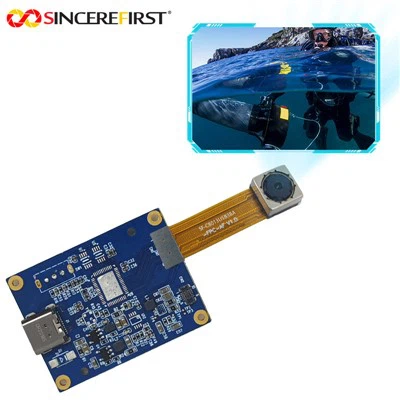
As a supplier of 4K USB Camera Modules, I've seen firsthand the growing demand for high - quality imaging in various fields, from professional photography and videography to industrial inspection and live streaming. A 4K USB camera module offers stunning resolution and sharpness, making it an excellent choice for those who want to capture every detail. In this blog, I'll share some tips on how to take great photos with a 4K USB camera module.
1. Understanding Your 4K USB Camera Module
Before you start taking photos, it's essential to understand the features and capabilities of your camera module. Different models may have unique functions, such as adjustable focus, exposure settings, and white balance.
For instance, our 2MP GC2755 Fixed Focus USB Camera Module is designed with a fixed focus, which is great for applications where the subject distance remains relatively constant. On the other hand, the Sony 8MP IMX415 4K Ultra Low Light USB Camera Module excels in low - light environments, thanks to its advanced sensor technology.
Read the user manual carefully to familiarize yourself with the camera's controls. Learn how to adjust settings like aperture, shutter speed, and ISO to get the best results. Most 4K USB camera modules come with software that allows you to control these settings easily from your computer.
2. Choosing the Right Environment
The environment plays a crucial role in photography. When using a 4K USB camera module, you need to pay attention to lighting, background, and the overall composition of the scene.
Lighting: Good lighting is the key to great photos. Natural light is often the best option, especially for portrait and landscape photography. If you're shooting indoors, use softbox lights or diffusers to create even lighting. Avoid harsh shadows, as they can make your photos look unflattering.
Background: A cluttered or distracting background can take away from the main subject of your photo. Choose a simple and clean background that complements your subject. You can use a plain wall, a backdrop, or a natural landscape as a background.
Composition: Follow the basic rules of composition, such as the rule of thirds. Imagine dividing your frame into a 3x3 grid and place your subject at the intersection points of the gridlines. This creates a more balanced and visually appealing photo.
3. Focusing on the Subject
One of the most important aspects of taking a good photo is getting the focus right. With a 4K USB camera module, you have several options for focusing.
Auto - Focus: Most camera modules come with an auto - focus feature. This is convenient, especially when you're shooting moving subjects or in situations where you need to quickly capture a moment. To use auto - focus, simply point the camera at your subject and press the capture button. The camera will automatically adjust the focus.
Manual Focus: In some cases, you may want to use manual focus for more precise control. Manual focus allows you to set the focus exactly where you want it, which is useful for macro photography or when you want to create a shallow depth of field. Our Low - Cost 5MP Full HD OV5640 Cmos Industrial USB Camera Module offers manual focus capabilities, giving you more flexibility in your photography.
4. Adjusting Exposure Settings
Exposure refers to the amount of light that reaches the camera's sensor. A well - exposed photo has a good balance between highlights and shadows.
Aperture: The aperture controls the size of the opening in the lens. A larger aperture (smaller f - number) allows more light to enter the camera and creates a shallow depth of field, which is great for portrait photography. A smaller aperture (larger f - number) is ideal for landscape photography, as it keeps more of the scene in focus.
Shutter Speed: The shutter speed determines how long the camera's sensor is exposed to light. A faster shutter speed is used to freeze motion, while a slower shutter speed can be used to create motion blur for creative effects.
ISO: The ISO setting controls the sensitivity of the camera's sensor. A higher ISO value makes the sensor more sensitive to light, which is useful in low - light situations. However, increasing the ISO can also introduce noise into your photos. Try to keep the ISO as low as possible to maintain image quality.
5. Using the Right Accessories
Accessories can enhance the performance of your 4K USB camera module and allow you to take more creative photos.
Tripod: A tripod is essential for keeping your camera steady, especially when using long shutter speeds or when you need to take a series of photos from the same position. It helps to eliminate camera shake and ensures sharp and clear images.
Lens Filters: Lens filters can be used to modify the light that enters the camera. For example, a polarizing filter can reduce glare and reflections, making colors more vibrant. A neutral density filter can be used to reduce the amount of light entering the camera, allowing you to use slower shutter speeds in bright conditions.
6. Post - Processing
Once you've taken your photos, post - processing can help you enhance their quality and bring out the best in them. There are many software options available, such as Adobe Photoshop and Lightroom.
Adjusting Colors: You can adjust the color temperature, saturation, and contrast of your photos to make them more appealing. Use levels and curves to correct exposure and highlight any details.
Sharpening: Sharpening can improve the clarity of your photos. However, be careful not to over - sharpen, as this can make your photos look artificial.


7. Testing and Experimenting
Don't be afraid to test and experiment with different settings and techniques. Take a series of photos with different aperture, shutter speed, and ISO settings to see how they affect the final image. Try shooting from different angles and perspectives to add variety to your photos.
In conclusion, taking great photos with a 4K USB camera module requires a combination of understanding the camera's features, choosing the right environment, adjusting settings, using accessories, and post - processing. With practice and experimentation, you'll be able to capture stunning images that showcase the high - quality capabilities of your camera.
If you're interested in purchasing a 4K USB camera module for your photography or other applications, please feel free to contact us for more information and to discuss your specific requirements. We're here to help you find the best camera solution for your needs.
References
- Photography Basics: A Guide to Aperture, Shutter Speed, and ISO. [Author's Name], [Publication Date]
- The Art of Composition in Photography. [Author's Name], [Publication Date]
- Using Accessories to Enhance Your Photography. [Author's Name], [Publication Date]