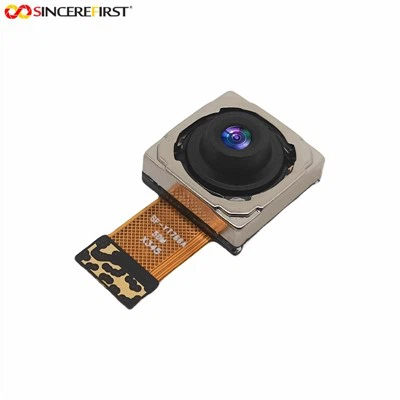
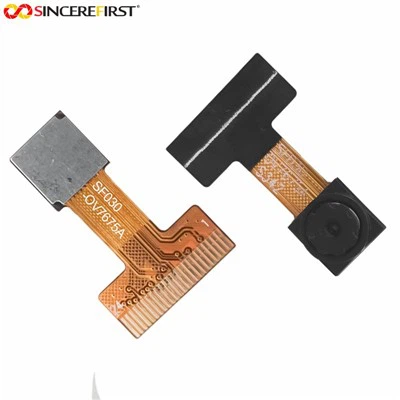
Hey there! As a supplier of Dvp Camera Modules, I often get asked about the video formats these modules support. So, I thought it'd be cool to break it down for you in this blog post.
First off, let's understand what a Dvp Camera Module is. Dvp stands for Digital Video Port, and these camera modules are used to capture and transfer video data digitally. They're super popular in various applications, from security cameras to smart home devices and even in some industrial monitoring systems.
Now, onto the main question: What video formats are supported? Well, the supported video formats can vary depending on the specific model of the Dvp Camera Module. But I'll go over some of the common ones you'll likely come across.
Common Video Formats Supported
JPEG
JPEG (Joint Photographic Experts Group) is one of the most widely supported formats by Dvp Camera Modules. It's a lossy compression format, which means it reduces the file size by discarding some of the image data. This is great for applications where you need to save storage space or transfer the video data quickly over a network.
For example, our OV5640 5MP ESP32 Cam DVP Camera Module supports JPEG encoding. This makes it perfect for projects like building a simple IP camera for home security. You can capture high-resolution images and videos in JPEG format and easily stream them to your smartphone or computer.
YUV
YUV is another common format supported by Dvp Camera Modules. Unlike JPEG, YUV is an uncompressed or less-compressed format that separates the luminance (Y) and chrominance (U and V) components of the video. This format is often used in applications where you need to process the video data in real-time, such as in computer vision projects.
Our 2MP Omnivision OV2640 DVP Camera Module supports YUV formats. If you're working on a project that involves object detection or facial recognition, the YUV format can provide the raw data you need for accurate processing.
H.264
H.264 is a popular video compression standard that offers high-quality video with relatively small file sizes. It's widely used in video streaming services, surveillance systems, and other applications where bandwidth is a concern.
Some of our more advanced Dvp Camera Modules, like the 5MP OV5640 Camera Module For Raspberry Pi, support H.264 encoding. This allows you to capture high-definition videos and stream them over the internet without using too much data.


Factors Affecting Supported Video Formats
The supported video formats of a Dvp Camera Module can be influenced by several factors.
Processor Capability: The onboard processor of the camera module plays a crucial role in determining which video formats it can support. A more powerful processor can handle complex encoding algorithms, such as H.264, while a less powerful one may be limited to simpler formats like JPEG.
Memory and Storage: The amount of memory and storage available on the camera module also affects the supported video formats. Compressed formats like JPEG and H.264 require less storage space, so they're more suitable for modules with limited memory. On the other hand, uncompressed formats like YUV need more storage and memory to process and store the video data.
Application Requirements: The specific requirements of your application can also determine the video format you need. For example, if you're building a surveillance system that requires long-term video recording, a compressed format like H.264 would be ideal. But if you're working on a real-time video processing project, YUV might be a better choice.
Choosing the Right Video Format for Your Project
When choosing a video format for your project, you need to consider several factors.
Quality vs. File Size: If you need high-quality video, you might want to choose a less-compressed format like YUV. But keep in mind that this will result in larger file sizes. On the other hand, if you're more concerned about saving storage space or bandwidth, a compressed format like JPEG or H.264 would be a better option.
Processing Requirements: Consider the processing power available in your system. If you have limited processing resources, a simpler format like JPEG might be easier to handle. But if you have a powerful processor, you can choose a more complex format like H.264 for better video quality.
Compatibility: Make sure the video format you choose is compatible with your existing hardware and software. For example, if you're using a specific video player or streaming service, check if it supports the format you want to use.
Conclusion
In conclusion, the video formats supported by Dvp Camera Modules can vary depending on the specific model and several other factors. JPEG, YUV, and H.264 are some of the common formats you'll come across. When choosing a video format for your project, consider factors like quality, file size, processing requirements, and compatibility.
If you're interested in purchasing Dvp Camera Modules for your project, we're here to help. We offer a wide range of high-quality camera modules with different features and supported video formats. Contact us for more information and to start a procurement discussion. We'll work with you to find the perfect solution for your needs.
References
- General knowledge of digital camera technology and video formats.
- Product specifications of our Dvp Camera Modules.