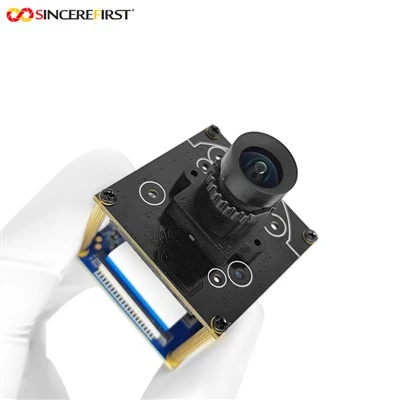
As a provider of Camera Raspberry Pi, understanding the storage requirements for Raspberry Pi camera recordings is crucial. This knowledge not only helps users make informed decisions but also allows us to offer the most suitable products to meet their needs.


Factors Affecting Storage Requirements
Resolution
The resolution of the camera significantly impacts the storage requirements. Higher resolutions result in larger file sizes. For example, a 1080p (1920x1080) video will take up more space than a 720p (1280x720) video. The 12MP IMX708 Raspberry Pi Camera Module offers high - resolution recording capabilities, which can capture detailed images and videos. However, with its high megapixel count, the storage demand will be relatively high.
Frame Rate
The frame rate, measured in frames per second (fps), also plays a vital role. A higher frame rate means more frames are captured per second, leading to larger file sizes. For instance, a video recorded at 60fps will have twice as many frames as one recorded at 30fps in the same time period. If you are using a camera for fast - moving object tracking or high - action scenarios, a higher frame rate might be necessary, but it will consume more storage.
Recording Duration
The length of the recording is another obvious factor. The longer the recording, the more storage space it will require. For continuous surveillance applications, where the camera is recording 24/7, the storage needs can quickly add up.
Compression Format
Different compression formats can reduce the file size of the recordings. Common video compression formats include H.264 and H.265. H.265 offers better compression efficiency compared to H.264, which means it can achieve similar video quality with a smaller file size. When choosing a camera, it's important to consider the supported compression formats to optimize storage usage.
Calculating Storage Requirements
To calculate the storage requirements, we can use the following general formula:
Storage Requirement (GB) = (Bitrate (Mbps) × Recording Time (hours) × 0.45)
The bitrate is determined by the resolution, frame rate, and compression format. For example, a 1080p video at 30fps with H.264 compression might have a bitrate of around 8Mbps. If you want to record for 24 hours, the storage requirement would be:
Storage Requirement = (8 × 24 × 0.45) = 86.4GB
Recommended Storage Solutions
SD Cards
SD cards are a popular choice for Raspberry Pi camera recordings. They are relatively inexpensive and easy to install. However, their capacity and speed can vary. For high - resolution and high - frame - rate recordings, it's recommended to use a high - speed SD card with a large capacity. Class 10 or UHS - I SD cards are suitable for most Raspberry Pi camera applications.
External Hard Drives
For long - term and large - scale recordings, external hard drives are a better option. They offer much larger storage capacities compared to SD cards. You can connect an external hard drive to the Raspberry Pi via USB. Make sure the hard drive has sufficient power supply, especially for larger capacity drives.
Network - Attached Storage (NAS)
NAS devices provide a centralized storage solution. Multiple Raspberry Pi cameras can be connected to a NAS, allowing for easy management and access to the recordings. NAS devices also offer features like data redundancy and remote access.
Our Camera Raspberry Pi Products
We offer a wide range of Camera Raspberry Pi products, including the 12MP IMX708 Raspberry Pi Camera Module and the Ambarella Camera Module. These cameras are designed to provide high - quality recordings while being compatible with various storage solutions.
The 12MP IMX708 Raspberry Pi Camera Module offers excellent image quality with its 12 - megapixel sensor. It can capture sharp and detailed images and videos, making it suitable for applications such as surveillance, photography, and video production.
The Ambarella Camera Module is known for its advanced video processing capabilities. It supports high - resolution and high - frame - rate recordings, and it can work well with different compression formats to optimize storage usage.
Considerations for Different Applications
Surveillance
In surveillance applications, continuous recording is often required. Therefore, large - capacity storage solutions are necessary. Using a combination of an external hard drive and a NAS can ensure that all the recordings are safely stored and can be easily accessed for later review.
Photography and Video Production
For photography and video production, the focus is on high - quality recordings. The 12MP IMX708 Raspberry Pi Camera Module is a great choice. However, since high - resolution and uncompressed files can be very large, it's important to have sufficient storage space. External hard drives or high - capacity SD cards are recommended.
Conclusion
Understanding the storage requirements for Raspberry Pi camera recordings is essential for both users and providers. By considering factors such as resolution, frame rate, recording duration, and compression format, users can calculate the storage needs accurately and choose the most suitable storage solutions. As a Camera Raspberry Pi provider, we are committed to offering high - quality camera modules and providing guidance on storage requirements. If you are interested in our products or have any questions about storage solutions for Raspberry Pi camera recordings, please feel free to contact us for procurement and further discussions. We are here to help you make the best decisions for your projects.
References
- Raspberry Pi official documentation
- Video compression standards research papers
- Camera module technical specifications from manufacturers