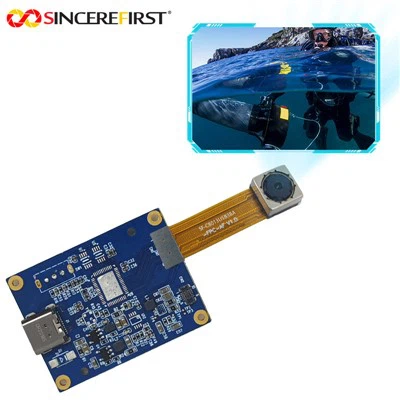
Hey there! As a supplier of FPC Camera Modules, I've seen my fair share of issues pop up with these little gadgets. In this blog, I'm gonna walk you through some common problems you might encounter with FPC Camera Modules and how to troubleshoot them.
1. No Image or Blank Screen
One of the most frustrating problems is when you turn on the camera and all you see is a blank screen. There could be a few reasons for this.
Loose Connections
First off, check the connections. FPC Camera Modules rely on flexible printed circuits to connect to the main device. Over time, these connections can become loose due to vibrations, movement, or just general wear and tear. Make sure the FPC cable is properly seated in its connector on both the camera module and the device. If it's loose, gently push it in until you hear a click or feel it lock into place.
Power Issues
Another possibility is a power problem. The camera module might not be getting enough power to function properly. Check the power supply to the camera. Make sure the voltage and current ratings match the specifications of the camera module. You can use a multimeter to measure the voltage at the power pins of the camera connector. If the voltage is too low, there could be an issue with the power source or a faulty regulator on the device.
Software Glitches
Sometimes, the problem isn't with the hardware at all but with the software. The camera driver might be outdated or corrupted. Try updating the camera driver to the latest version. You can usually find the driver on the manufacturer's website. If that doesn't work, try resetting the device to its factory settings. This will wipe all the data and settings, so make sure you back up any important information first.
2. Poor Image Quality
If the images taken by the FPC Camera Module are blurry, grainy, or have color issues, there are a few things you can do.
Lens Cleaning
The lens of the camera can get dirty over time, which can affect the image quality. Use a soft, lint-free cloth to gently clean the lens. Avoid using harsh chemicals or abrasive materials, as these can scratch the lens. If there are stubborn smudges, you can use a small amount of lens cleaning solution on the cloth.
Focus Adjustment
Some FPC Camera Modules have adjustable focus. If the images are blurry, try adjusting the focus. You can usually do this by turning a small screw or using a focus adjustment tool provided by the manufacturer. Make sure to adjust the focus in a well-lit environment and take test shots to see if the image quality improves.
Camera Settings
Check the camera settings to make sure they are optimized for the environment. For example, if you're taking pictures in low light, try increasing the ISO setting to make the camera more sensitive to light. You can also adjust the white balance to ensure the colors in the images look natural.


3. Flickering or Stuttering Images
If the images on the screen are flickering or stuttering, it could be due to a few factors.
Electrical Interference
Electrical interference can cause the images to flicker or stutter. Make sure the camera module is properly shielded from other electrical components in the device. You can also try using a ferrite bead on the FPC cable to reduce electromagnetic interference.
Frame Rate Issues
The frame rate of the camera might be too high for the device to handle. Try reducing the frame rate in the camera settings. You can also try using a different video format or resolution to see if that improves the performance.
Overheating
If the camera module is overheating, it can cause the images to flicker or stutter. Make sure the camera is properly ventilated and not blocked by any objects. You can also try reducing the usage time of the camera to prevent it from overheating.
4. Camera Not Detected
If the device doesn't detect the FPC Camera Module at all, there could be a few reasons.
Compatibility Issues
Make sure the camera module is compatible with the device. Check the specifications of the camera module and the device to ensure they are compatible. Some devices might require a specific type of camera module or a certain version of the camera driver.
Hardware Damage
There could be a problem with the camera module itself. Check for any visible damage to the camera module, such as cracks or bent pins. If you suspect hardware damage, you might need to replace the camera module. You can find replacement camera modules on our website, including the SF5X258ABC-LAT.
Connector Problems
The connector on the device might be damaged or dirty. Check the connector for any signs of damage or corrosion. If it's dirty, you can use a small brush or compressed air to clean it.
5. Error Messages
If the camera module is displaying error messages, it can give you a clue about what's wrong.
Read the Error Message
Carefully read the error message to see what it says. The error message might indicate a specific problem, such as a communication error or a hardware failure. Look up the error code on the manufacturer's website or in the user manual to find out more about the problem and how to fix it.
Contact Technical Support
If you're still having trouble after trying the troubleshooting steps above, don't hesitate to contact our technical support team. We have a team of experts who can help you diagnose and fix the problem. You can reach out to us through our website or by phone.
Conclusion
Troubleshooting FPC Camera Module problems can be a bit of a challenge, but with a little patience and some basic knowledge, you can usually fix the issues. Remember to check the connections, power supply, software, and hardware components. If you're still having trouble, don't hesitate to contact us. We're here to help you get the most out of your FPC Camera Module.
If you're interested in purchasing FPC Camera Modules or have any questions about our products, feel free to contact us for a procurement discussion. We offer high-quality FPC Camera Modules at competitive prices and excellent customer service.
References
- Manufacturer's User Manuals
- Online Forums and Communities
- Camera Driver Websites