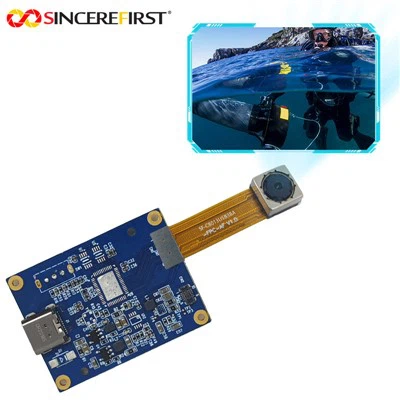
Underwater 3D photography is an exciting field that combines the beauty of the underwater world with the precision of 3D imaging technology. The Raspberry Pi camera, known for its versatility and affordability, can be a powerful tool for this purpose. As a supplier of Camera Raspberry PI products, I'm here to guide you through the process of using the Raspberry Pi camera for underwater 3D photography.


Understanding the Basics of Underwater 3D Photography
Before diving into the technical details, it's important to understand the principles behind underwater 3D photography. Unlike traditional 2D photography, 3D photography captures depth information in addition to the standard two - dimensional image. This is typically achieved by using multiple cameras or a single camera with a specialized setup to create a stereo effect.
In an underwater environment, there are additional challenges such as water turbidity, light absorption, and pressure. Water absorbs different wavelengths of light at different rates, which can affect the color and clarity of the image. Turbidity can scatter light, reducing the sharpness of the image. And the high pressure underwater requires the camera to be properly protected.
Choosing the Right Raspberry Pi Camera
As a Camera Raspberry PI supplier, we offer a range of camera modules suitable for underwater 3D photography. The Raspberry PI Camera Module is a popular choice. It has a high - resolution sensor that can capture detailed images, which is essential for 3D reconstruction.
Another option is the Ambarella Camera Module. This module is known for its advanced image processing capabilities, which can help to compensate for the effects of water on the image. It can enhance color accuracy and reduce noise, resulting in clearer and more vibrant 3D images.
If you need autofocus functionality, the Arducam 8mp Autofocus is a great option. Autofocus is particularly useful in underwater environments where the distance to the subject can vary, ensuring that your images are always in sharp focus.
Preparing the Camera for Underwater Use
Once you've chosen the right camera, the next step is to prepare it for underwater use. You'll need a waterproof housing for the Raspberry Pi and the camera. The housing should be able to withstand the pressure at the depth you plan to photograph. Make sure the housing has a clear window that is made of a material that doesn't distort the image.
It's also important to seal all the connections properly to prevent water from entering. You may need to use waterproof cables and connectors. Additionally, consider using a pressure relief valve in the housing to equalize the pressure inside and outside the housing as you descend and ascend.
Setting Up the 3D Photography System
For underwater 3D photography, you'll typically need to set up a stereo camera system. This involves using two cameras placed a certain distance apart to mimic the way human eyes perceive depth. The distance between the cameras, known as the baseline, will depend on the type of subjects you want to photograph and the depth of the water.
You can mount the two cameras on a rigid frame to ensure that they are parallel and properly aligned. The frame should be made of a material that is resistant to corrosion in the underwater environment, such as stainless steel or plastic.
Calibrating the Cameras
Calibration is a crucial step in underwater 3D photography. It involves determining the intrinsic and extrinsic parameters of the cameras. Intrinsic parameters include the focal length, principal point, and distortion coefficients of the camera lens. Extrinsic parameters describe the relative position and orientation of the two cameras in the stereo system.
There are several software tools available for camera calibration. You can use the OpenCV library, which provides a set of functions for camera calibration. To calibrate the cameras, you'll need a calibration pattern, such as a checkerboard pattern. Place the calibration pattern in the water at different distances and angles, and capture images with both cameras. Then use the calibration software to calculate the camera parameters based on these images.
Capturing Underwater 3D Images
Once the cameras are calibrated, you're ready to start capturing underwater 3D images. Make sure to adjust the camera settings such as exposure, white balance, and focus according to the lighting conditions in the water.
When taking the images, try to keep the cameras as steady as possible. You can use a tripod or a stabilizer to reduce camera shake. Take multiple sets of images from different angles and distances to get a comprehensive view of the underwater scene.
Processing the 3D Images
After capturing the images, you'll need to process them to create a 3D model. There are several software tools available for 3D reconstruction, such as MeshLab and Agisoft Metashape. These tools use the stereo images to calculate the depth information and generate a 3D point cloud or mesh.
The processing steps typically include feature extraction, stereo matching, and 3D reconstruction. Feature extraction involves identifying distinctive points in the images, such as corners and edges. Stereo matching then finds the corresponding points in the two images. Finally, the 3D reconstruction algorithm uses the depth information from the stereo matching to create the 3D model.
Tips for Successful Underwater 3D Photography
- Lighting: Use external lights to illuminate the underwater scene. LED lights are a popular choice as they are energy - efficient and can provide a bright, even light.
- Subject Selection: Choose subjects that have distinct features and textures. This will make it easier for the 3D reconstruction software to identify and match the features in the images.
- Practice: Underwater 3D photography is a skill that takes time to master. Practice in a controlled environment, such as a swimming pool, before venturing into the open water.
Contact for Procurement and Further Discussion
If you're interested in purchasing any of our Camera Raspberry PI products for underwater 3D photography, or if you have any questions or need further guidance, we'd love to hear from you. Our team of experts is ready to assist you in choosing the right products and setting up your underwater 3D photography system.
References
- Hartley, R., & Zisserman, A. (2003). Multiple View Geometry in Computer Vision. Cambridge University Press.
- Szeliski, R. (2010). Computer Vision: Algorithms and Applications. Springer.
- OpenCV Documentation. (n.d.). Retrieved from the official OpenCV website.