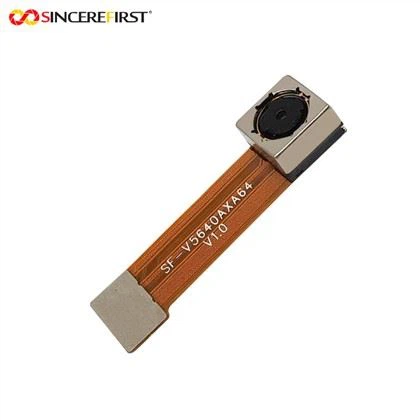
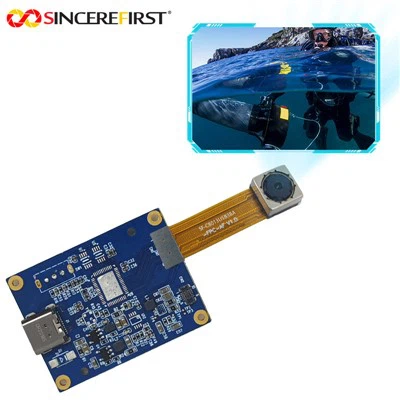
Hey there! As a supplier of 2MP camera modules, I'm stoked to share with you how to use these nifty little devices for remote monitoring. Whether you're keeping an eye on your home, a business, or a construction site, a 2MP camera module can be a game - changer.
Understanding the Basics of a 2MP Camera Module
First things first, let's talk about what a 2MP camera module actually is. A 2MP (two - megapixel) camera module means it can capture images with a resolution of around 1600x1200 pixels. This is plenty for most remote monitoring needs, giving you clear enough images to identify people and objects.
These modules are usually small and compact, making them easy to install in various locations. They can be powered in different ways, like through USB or a power adapter, depending on the model.
Choosing the Right Location
The success of your remote monitoring setup largely depends on where you place the camera module. You want to choose a spot that gives you a good view of the area you want to monitor.
For example, if you're using it to monitor your home, you might place it near the front door to see who's coming and going. If it's for a business, you could put it in a corner of the store to keep an eye on the aisles. Make sure the camera is mounted securely so it doesn't move around. And don't forget to consider the lighting. Try to avoid direct sunlight, as it can wash out the images, and if it's a low - light area, you might need a camera with good night - vision capabilities.
Connecting the Camera Module
Once you've found the perfect spot, it's time to connect the camera. Most 2MP camera modules are pretty easy to set up. If it's a USB - powered module, you can simply plug it into a computer or a compatible device. Some modules also support Wi - Fi connectivity, which is super handy for remote access.
To connect via Wi - Fi, you'll usually need to follow a few steps. First, power on the camera module and put it in pairing mode. Then, on your smartphone or tablet, go to the Wi - Fi settings and select the camera's network. After that, you might need to enter a password if required. Once connected, you can use a dedicated app to view the camera feed.
Setting Up Remote Access
Remote access is what makes these camera modules so great for monitoring. There are a few ways to achieve this. If you've connected the camera to a computer, you can use software that allows you to access the computer remotely. For example, TeamViewer or AnyDesk are popular options. You'll need to install the software on both the computer with the camera and the device you want to use for remote viewing.
If your camera module has built - in Wi - Fi and supports cloud storage, you can use the camera's app to access the feed from anywhere in the world. Just make sure your device has an internet connection.
Configuring the Camera Settings
Most 2MP camera modules come with a range of settings that you can adjust to get the best results. You can usually set the resolution, frame rate, and exposure.
The resolution setting determines how clear the images are. For remote monitoring, 2MP is usually sufficient, but you can play around with it to see what works best for you. The frame rate affects how smoothly the video plays. A higher frame rate means smoother video, but it also uses more bandwidth.
The exposure setting is important for getting the right amount of light in the images. If it's too bright, the images will be over - exposed, and if it's too dark, they'll be under - exposed. You can usually set it to automatic or adjust it manually.
Our Product Recommendations
We have a great range of camera modules that you might be interested in. Check out our 1080P FHD Sony Imx291 Starlight - Level CMOS Face Recognition USB Camera Module. It's got excellent image quality and is perfect for face recognition applications.
Another great option is the Free Drive Snoy 8MP IMX415 Wifi Board CMOS Machine Vision System Camera Module. With 8MP resolution, it gives you even clearer images and is ideal for more detailed monitoring.
If you're looking for something a bit more budget - friendly, the OV5640 5MP Fixed Focus USB Camera Module is a great choice. It still offers good quality images and is easy to set up.
Troubleshooting
Sometimes, things don't go as smoothly as we'd like. If you're having trouble getting the camera to work, here are a few things to check.
First, make sure the camera is properly connected and powered on. Check the cables for any signs of damage. If you're having issues with the remote access, check your internet connection and make sure the camera is still connected to the network.
If the images are blurry, it could be that the lens is dirty. You can clean it gently with a soft, dry cloth. And if the camera is overheating, make sure it has proper ventilation.
Contact Us for Purchasing
If you're interested in our 2MP camera modules or any of the other products I've mentioned, we'd love to hear from you. We can provide you with more detailed information, answer any questions you might have, and help you choose the right camera module for your needs. Just reach out to us, and we'll start the conversation about how we can work together.

References
- General knowledge about camera modules and remote monitoring.
- Product specifications and user manuals of our 2MP camera modules.